 Landon Curt Noll
f29b37e49a
Landon Curt Noll
f29b37e49a
Prepare for the winners of **IOCCC28**.

> However these are not the 2024 droids you are looking for.  :-)

The HTML menu (both JavaScript and non-JavaScript) has been updated.

The `Status -> Rules and guidelines' have been replaced with two
separate menus `Status -> IOCCC rules` and `Status -> IOCCC guidelines`.

Added a new top level `social.html` page: built from a new `social.md`.

Sorted rules for building specific web pages in the top level `Makefile`.
Added `make social` to make the `social.html` page from `social.md`.

The `bin/gen-top-html.sh` now is able to process a argument of **social**
to process the new top level `social.html` page.

Changed `bin/gen-top-html.sh` VERSION from "2.0.0 2025-03-13"
to "2.0.1 2025-07-25".

Below `About -> Home page` a new `About -> IOCCC social media` menu item
as added.

Because the menu change touched every HTML file, we changed the general
copyright date range for HTML files from "1984-2024" to "1984-2025"
due to the extensive changes made for **IOCCC28**.

Those markdown files that were modified in 2025 had their copyright date
range also changed from "1984-2024" to "1984-2025".

Rebuilt tarballs and sitemap due to the extensive HTML rebuilding.

Ran `make update` to perform the above.

To build:
make
There is an alternate version that should work with Windows. See Alternate code below.
To use:
./prog > lena.ppm
Try:
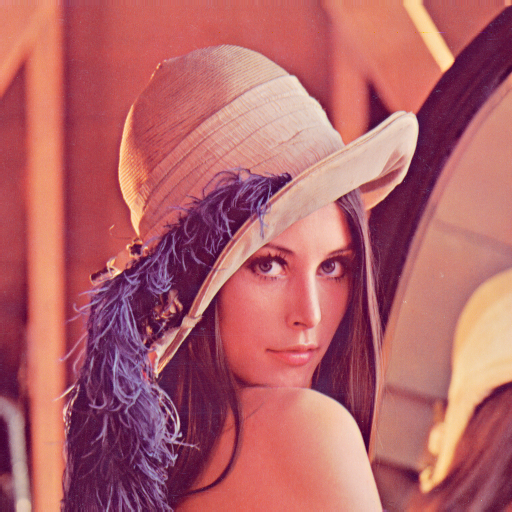
First open Lenna.png in your graphics viewer of choice. Next, after
running the above command (./prog > lena.ppm), open lena.ppm in your
graphics viewer of choice. After that try:
./try.sh
NOTE: the script uses the tools pngtopam(1) (or pngtopnm(1) for older
versions) and pnmscale come from the netpbm project and cjpeg(1) comes from
libjpeg-turbo. If you don't have these tools already see the
FAQ on "netpbm"
and the
FAQ on "libjpeg-turbo".
NOTE: Lenna.png is from https://upload.wikimedia.org/wikipedia/en/7/7d/Lenna_%28test_image%29.png.
Alternate code:
The prog.alt.c is based on the author's remarks and it should work for Windows.
Alternate build:
make alt
Alternate use:
Use prog.alt as you would prog.
Judges' remarks:
The file small.jpg will be approximately of the same size as the raw image
data in the program. Compare the level of the detail and the artifacts of
small.jpg and lena.ppm.
Compressing images is just a matter of simple arithmetic and some magic, isn't it?
We could understand some of the arithmetic but none of the magic.
Deciphering the mechanism used for data encoding to make use of whitespace, braces and semicolons should be a slightly easier task.
Author's remarks:
Warning: the program is not protected against invalid input.
This program outputs a 128x128 RGB image file to the standard output using the portable pixmap file format (PPM). It contains the famous "Lena" image which is used in many image compression tests.
The uncompressed image is 12 times larger than the source code of the program which includes the image data and the complete decoder. The actual image data is 1220 byte long, which gives a compression ratio of 40. Using a JPEG-like algorithm would not be enough to reach this level of compression (the Lena image would be barely recognizable). So the algorithm is based on the latest advances in image compression. It includes the following features:
- DCT transform with variable block size (4x4, 8x8, 16x16 and 32x32)
- DC and directional predictors
- arithmetic coding
- YCgCo color space.
The image data is encoded to a C string with some tricks to make the best use of the IOCCC size constraints. The identifiers were shortened to a single letter to save space. No specific obfuscation was needed as the algorithms already have a significant complexity.
Although the program was optimized to decompress its built-in image, it accepts to decompress image files from its standard input. Examples:
    ./prog d < lena512.bin > lena512.ppm
    ./prog d < fruits.bin > fruits.ppm
    ./prog d < vintage_cars.bin > vintage_cars.ppm
The original images for fruits and vintage cars come from Wikipedia and were resized to a width of 1024 pixels.


The program should be portable on any Unix system. On Windows the line
_setmode(0, 32768); _setmode(1, 32768); must be added at the start of
the main() function to avoid unwanted carriage return characters in
the output.