 Landon Curt Noll
c5848302e8
Landon Curt Noll
c5848302e8
Thank you, @chris-sab, for your excellent work and for helping us
commit this alpha version of the topbar.

As part of this work, the following HTML sections were removed:

* begin-row
* begin-leftcolumn
* sidenav
* end-leftcolumn
* begin-rightcolumn
* before-content
* end-rightcolumn
* end-row.default

Also added a new HTML section, just above the "header" section:

* topbar

The web site now as a more modern looking topbar, thanks to the
work of the contractor (GitHub user @chris-sab) who is working on
issue #2273.

Performed `make www` to implement the above and test under macOS.

TODO: Fix the Responsive Web Design to deal with
      the new topbar system.

TODO: Improve the topbar.  What is there now is
      just an alpha version.

TODO: Decide what to do with `png/ioccc.png`.
      Remove it make selective use of the image on certain top level
      pages lower down?

TODO: The changes to `ioccc.css` causes some
      formatting problems with pages such as `location.html` (missing
      blank lines).  Fix formatting problems as needed.

TODO: Fix the "Nu HTML check this web page"
      links on things like the year level _YYYY/index.html_ pages.

TODO: Correct all HTML errors, warnings and perhaps
      informative messages from the Nu HTML check.

TODO: Consider adding color (colour) to the
      web pages in such a way that people with color perception
      challenges can still use the web site.

TODO: For those web browsers that have and allow
      JavaScript, make use of technology such as [Code
      Mirror](https://codemirror.net/) to directly render source
      code (C, shell, Makefile, etc.) with syntax coloring (colouring)
      directly in the browser.  For non-JavaScript browsers, fallback
      to the current use of GitHub source code viewing.

To build:
make
There is an alternate version that should work with Windows. See Alternate code below.
To use:
./prog > lena.ppm
Try:
First open Lenna.png in your graphics viewer of choice. Next, after
running the above command (./prog > lena.ppm), open lena.ppm in your
graphics viewer of choice. After that try:
./try.sh
NOTE: the script uses the tools pngtopam(1) (or pngtopnm(1) for older
versions) and pnmscale come from the netpbm project and cjpeg(1) comes from
libjpeg-turbo. If you don't have these tools already see FAQ 3.15 - How do I
compile and install netpbm for entries that require it? and
FAQ 3.16 - How do I compile and install libjpeg-turbo for entries that require
it?.
NOTE: Lenna.png is from https://upload.wikimedia.org/wikipedia/en/7/7d/Lenna_%28test_image%29.png.
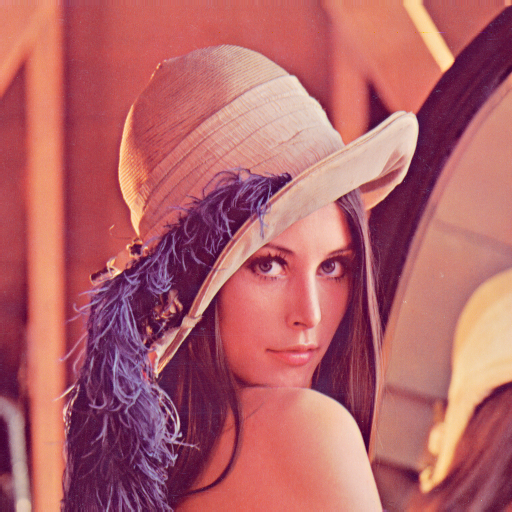
Alternate code:
The prog.alt.c is based on the author's remarks and it should work for Windows.
Alternate build:
make alt
Alternate use:
Use prog.alt as you would prog.
Judges' remarks:
The file small.jpg will be approximately of the same size as the raw image
data in the program. Compare the level of the detail and the artifacts of
small.jpg and lena.ppm.
Compressing images is just a matter of simple arithmetic and some magic, isn't it?
We could understand some of the arithmetic but none of the magic.
Deciphering the mechanism used for data encoding to make use of whitespace, braces and semicolons should be a slightly easier task.
Author's remarks:
Warning: the program is not protected against invalid input.
This program outputs a 128x128 RGB image file to the standard output using the portable pixmap file format (PPM). It contains the famous "Lena" image which is used in many image compression tests.
The uncompressed image is 12 times larger than the source code of the program which includes the image data and the complete decoder. The actual image data is 1220 byte long, which gives a compression ratio of 40. Using a JPEG-like algorithm would not be enough to reach this level of compression (the Lena image would be barely recognizable). So the algorithm is based on the latest advances in image compression. It includes the following features:
- DCT transform with variable block size (4x4, 8x8, 16x16 and 32x32)
- DC and directional predictors
- arithmetic coding
- YCgCo color space.
The image data is encoded to a C string with some tricks to make the best use of the IOCCC size constraints. The identifiers were shortened to a single letter to save space. No specific obfuscation was needed as the algorithms already have a significant complexity.
Although the program was optimized to decompress its built-in image, it accepts to decompress image files from its standard input. Examples:
    ./prog d < lena512.bin > lena512.ppm
    ./prog d < fruits.bin > fruits.ppm
    ./prog d < vintage_cars.bin > vintage_cars.ppm
The original images for fruits and vintage cars come from Wikipedia and were resized to a width of 1024 pixels.


The program should be portable on any Unix system. On Windows the line
_setmode(0, 32768); _setmode(1, 32768); must be added at the start of
the main() function to avoid unwanted carriage return characters in
the output.